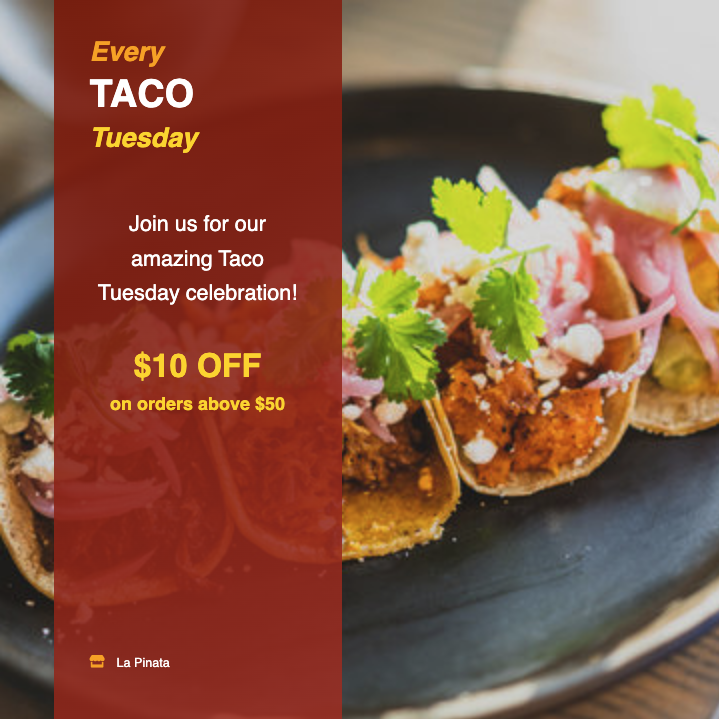
The Weekly Specials Flyer Template You Can Steal
Tunde Adewole
April 22, 2026
Here is the weekly specials flyer structure that keeps showing up in the ones our users make that get reused. Not the prettiest. Not the most creative. The one that works week after week because it is easy to fill in and easy to read.
Steal it. I will give you the prompt at the bottom.
The structure
Three sections, stacked top to bottom. Each gets about a third of the flyer.
Top third: one line, one number. The day of the week, then the headline deal. Nothing else.
Example:
Tuesday Tacos $2
That is the whole top third. Big type. Nothing competing for attention.
Middle third: the items. Two to three items, each with a price. Not a full menu. Not five options. Two or three. Each item gets one line.
Example:
Carne asada, chicken, al pastor Any two tacos, $2 each Add chips and salsa, $3
Bottom third: when and where. Time, day, address. In that order.
Example:
5 pm to 8 pm Every Tuesday 412 Mission St, San Francisco
That is the whole template. Headline, items, logistics. Three sections, clearly divided, readable from four feet away.
Why these three sections and not something fancier
Your customer is deciding whether to come in while they scroll their phone in line at the grocery store. They have three questions in this order, and you need to answer them in this order:
- What is the deal? (top)
- Do I want it? (middle)
- Can I get it? (bottom)
If the flyer makes them work to answer any of those, you lose them. The most common mistake is burying the time in tiny type at the bottom under a QR code and a social handle. By the time they look for "what time is this happening," they have already moved on.
Follow the three-section structure and you will outperform most of what is posted in your local Instagram feed on production value alone.
The prompt that generates this
In AIFlyer, paste a prompt like this. Fill in your own details.
Weekly specials flyer for [restaurant name]. Day of the week: [day]. Headline deal: [deal, e.g. "$2 tacos"]. Items: [list 2-3 items with prices]. Time: [start] to [end]. Address: [address]. Style: clean, three sections stacked, price is the biggest thing. Colors: [two brand colors].
Example for a real restaurant:
Weekly specials flyer for Luna Cafe. Day of the week: Tuesday. Headline deal: $2 tacos. Items: Carne asada, chicken, al pastor, any two for $2 each, chips and salsa add $3. Time: 5pm to 8pm. Address: 412 Mission St, San Francisco. Style: clean, three sections stacked, price is the biggest thing. Colors: teal and orange.
Paste, hit generate. You get the three-section flyer in about thirty seconds.
The two edits you will probably need
The first generation is going to be close but not perfect. Check these before you export:
1. Price size. If the headline price is not obviously the biggest thing on the flyer, drag it bigger. Two taps, done.
2. Photo. AIFlyer picks a stock image based on what you described. If you have a real photo of your tacos, swap it. Real food photos outperform stock photos roughly every time.
Everything else usually lands in the right place.
Why this template keeps working
I have seen hundreds of weekly specials flyers across the AIFlyer user base. The ones that get rebuilt week after week, and the ones whose restaurants keep subscribing, almost all look like this. Different fonts, different colors, different food. Same three-section bones.
The fancy ones do not survive week three. You run out of creative energy to design a different layout every Monday. The three-section template lasts because it gives you almost nothing to decide. You change four words and two numbers, the flyer is done, you get back to running the restaurant.
That is the whole point of weekly specials marketing. Consistent, readable, shippable. You want the flyer to be the easy part of your week, not a project.
Generate your weekly specials flyer →
FAQ
Can I use this structure for daily specials too? Yes. Swap "Tuesday" for the day, regenerate. Or keep the same flyer template and swap one word and one number each day. Takes thirty seconds per day.
What if I want to include more than three items? You can, but it usually hurts the flyer. If you have five items, post two flyers on different days. More flyers, less cluttered, both perform better than one busy flyer.
Does this work for food trucks? Yes. Replace "address" with current location or a schedule. Food trucks actually benefit the most from this structure because their customers scan-and-go, which means the three-section readability matters even more.
How often should I post a weekly specials flyer? The week of, at least once. Best case, post it the morning of the special, post it again at noon as a Stories reminder, repost as a Stories countdown an hour before it starts. Same flyer, three placements.